Create a new long section view for an alignment, display long sections associated with the alignment and rows containing information about the long section.
Manage / Window / 
 / New Long Section View or
Alignment / Long Section /  New or
Alignment / Long Section / 
Profile module
| Tabs | Description |
|---|---|
| General | Select an alignment to be associated with the long section view. |
| Content | Configure the rows to display in the long section view. |
| Display | Configure the appearance of items displayed in the long section views table. |
- Click to display the Long Section dialog, then select an alignment and the content to display in the long section view.
- Click , then select a long section template to create a long section view based on the template.
- You can create and use multiple long section views.
- A long section view is associated with a single alignment.
- All visible long sections associated with the alignment display in the long section view.
- Long sections and labels are displayed using the appearance settings selected for the long section in the Attributes tool window. When a long section view is created, the long sections layer determines the initial appearance of the long section.
- Configure where droplines are created in the long sections layer.
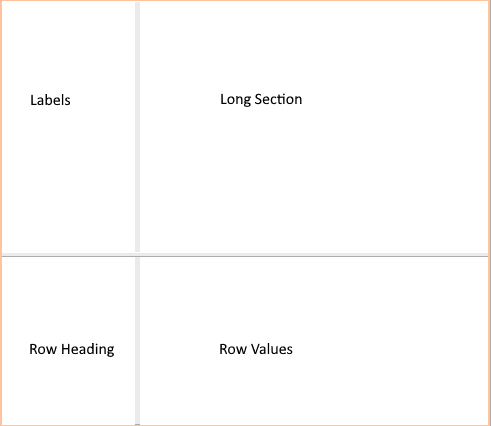
- A long section view consists of four regions:
- Long Section (Top Right) - Displays the visible long sections associated with the long section views alignment. You can use the select tools and the view tools in this region.
- Labels (Top Left) - Displays the long section names.
- Row Headings (Bottom Left) - Displays the heading for the values displayed in the row.
- Row Values (Bottom Right) - Displays heights, chainages or geometry at a horizontal distance along the long section. Column widths are dynamically scaled based on the zoom level and the camera position in the long section region.
- Widening the left region and zooming in the long section region retains the row headings cells size and the text height. Text is justified using the cell size not the region width. You should move the dividers and adjust the zoom level in the long section region so that all data is visible in the long section view.
- When droplines from key vertices in the long section are too close to fit the values in the column, include dropline widening to connect the lines with the values.
- You can undock a long section view but if you do, you should also undock the Create tool, Layer tool and Attributes tool windows.
- Right-click the view tab and select New Horizontal Tab Group to display the long section in a new docked window.